Best Way to Avoid Typos When Entering Card Details on a Phone
In today’s mobile-first world, entering credit card details on a phone during checkout happens every day – millions of times. Yet, typos and errors remain one of the biggest pain points for customers and retailers alike. Missed purchases, abandoned carts, and frustrated users often trace back to a simple issue: incorrect or incomplete payment information keyed in on a tiny smartphone keyboard.
If you’ve ever accidentally entered the wrong card number or expiration date on your phone, you know how annoying it can be. The good news is there are proven ways to dramatically reduce error rates during mobile checkout, improving the user experience and increasing the likelihood of completed purchases.
In this article, we’ll explore the best ways to avoid typos when entering card details on a phone, focusing on key tools like digital wallets and saved payment methods. We’ll also dive into mobile UX design tips and how biometrics can reduce friction and make payments both fast and error-free.
Phone-First Checkout Expectations in 2024
Before we dive into solutions, let’s set the stage with what customers expect when they checkout from their phones. Mobile devices now account for over half of all e-commerce traffic worldwide, so it’s not just “nice to have” a smooth mobile checkout—it’s essential.
- Speed: Users expect near-instant payment completion without long typing or multiple pages.
- Accuracy: Entering payment details must be easy to get right on small screens with soft keyboards.
- Security: Customers want confidence their card data is secure without extra hassle.
- Simplicity: Fewer steps in the checkout flow reduce frustration and cart abandonment.
With these expectations in mind, let’s review how digital wallets and saved payment methods help solve the typos problem.
Digital Wallets: The Prime Tool to Avoid Typos
Digital wallets like Apple Pay, Google Pay, and Samsung Pay have become the go-to payment methods on phones precisely because they cut down data entry to a bare minimum.
How Digital Wallets Work
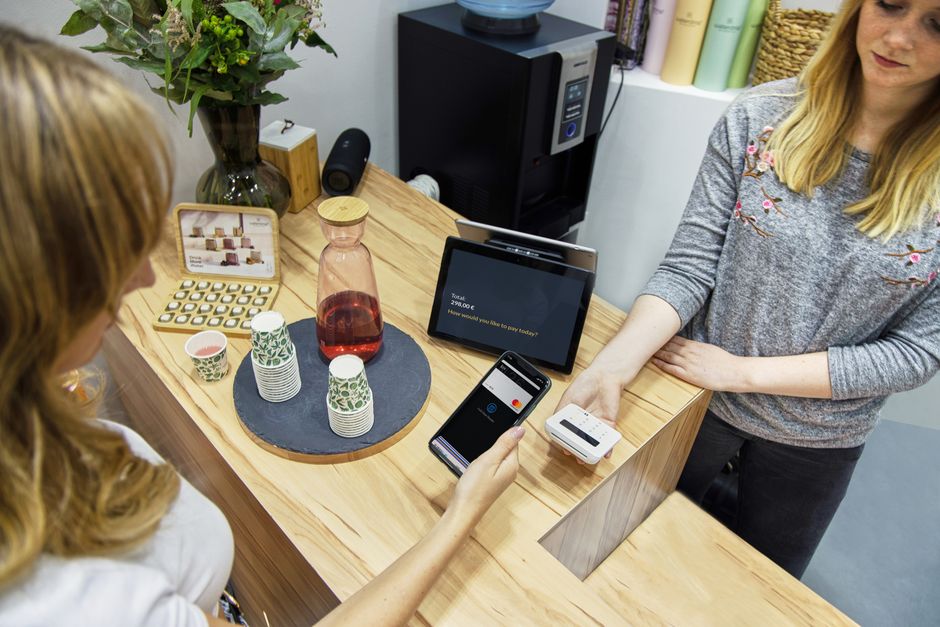
Instead of manually typing card details, users authorize payments using biometric authentication methods such as Face ID, Touch ID, or fingerprint sensors. The device sends encrypted payment credentials directly to the merchant, safely bypassing the need to enter card numbers and CVV codes.
Benefits of Digital Wallets in Preventing Typos
- No manual entry: Payment details are pre-stored and auto-filled securely, eliminating human error.
- Faster checkout: Fewer clicks and no typing means quicker completion times.
- Enhanced security: Tokens replace card numbers in transactions, reducing risk of theft.
- Consistency: Wallets use verified card information, avoiding mismatched expiration dates or billing addresses.
Supporting Customer Preference
Surveys show that shoppers who use digital wallets report fewer checkout mistakes and higher satisfaction. Many merchants now prioritize wallet compatibility to meet these expectations—and make checkout as smooth as possible.
Saved Payment Methods: Convenience Without Compromise
For those who prefer using multiple cards or don’t want to rely solely on digital wallets, saved payment methods provide a helpful middle ground. These are card details securely stored on your favorite shopping apps or websites, ready to autofill at checkout with just a tap.
How Saved Payment Methods Reduce Errors
- Secure card vaulting: Card numbers and expiration dates are encrypted and tokenized on the merchant’s backend or through payment gateways.
- Autofill functionality: When you begin typing your name or email, the saved cards appear as an option, avoiding manual typing altogether.
- Review and confirmation: Many UI designs display the last four digits, card type (Visa, Mastercard), and billing address for easy verification.
- Easy switching: Need to pick a different card? Switching saved cards is painless, avoiding re-entry mistakes.
Use Cases and Best Practices
Apps like Amazon, Walmart, and Shopify stores allow you to safely save multiple cards and quickly select one on mobile checkout. Just double-check that your saved billing address is current to avoid declines related to mismatched info.
Mobile UX Tips: Fewer Steps, Clear Totals, and Error Prevention
Besides the payment Click for info tools themselves, mobile checkout workflows greatly influence user accuracy and satisfaction. Here are design strategies that further reduce typos and abandoned carts:
1. Minimize Typing with Smart Inputs
- Use input masks for card number fields to insert spaces automatically and guide digit entry.
- Enable numeric keyboards for phone and card fields to reduce wrong key presses.
- Auto-advance cursor between date and CVV fields improves speed and reduces skips.
2. Show Clear Order Summaries and Payment Totals
Before final submission, a concise yet visually clear summary including order total, delivery fees, taxes, and payment method details helps customers catch unnoticed errors—especially when switching payment types.
3. Provide Real-Time Validation and Error Alerts
Immediate feedback on the correctness of card numbers (using the Luhn algorithm), expiration dates, and CVVs avoids frustration that arises after full form submission.
4. Use Progressive Disclosure
Only request essential payment information up front; reveal extra inputs like billing address or promo codes conditionally to keep the initial form less intimidating.
Biometrics: Reducing Friction and Errors in Mobile Checkout
Biometric authentication technologies like fingerprint scanners and facial recognition decrease payment friction and errors in two key ways:
- Speed: Customers authorize payments instantly by unlocking their device or authenticating within apps via biometrics instead of typing passwords or PINs.
- Accuracy: Since biometric confirmation correlates to a securely stored payment method (digital wallet or saved card), there is zero chance of mistyping card info.
Popular mobile platforms tightly integrate biometrics with digital wallets and apps, ensuring payment security while promoting ease of use. For instance:
Platform Biometric Method Integrated Payment Tool iOS Face ID, Touch ID Apple Pay + App Saved Cards Android Fingerprint, Face Unlock Google Pay + Saved Cards Samsung Devices Fingerprint, Iris Scan Samsung Pay + Saved CardsSummary: Combining Tools and Design for the Best Mobile Checkout Experience
Avoiding typos when entering card details on a phone is less about luck and more about leveraging the right tools and good design principles. Here’s a quick recap of the best practices that make mobile checkout faster, easier, and error-proof:
- Prioritize digital wallets wherever possible to eliminate manual entry—Apple Pay, Google Pay, Samsung Pay all offer fantastic frictionless experiences.
- Offer secure saved payment methods to allow quick selection of previously entered cards, with clear billing info and expiration dates.
- Design mobile forms for usability with input masks, numeric keyboards, real-time validation, and clear payment summaries.
- Leverage biometrics for fast, secure authentication that pairs seamlessly with digital wallet and saved card integrations.
By combining these strategies, merchants can meet modern phone-first checkout expectations while dramatically reducing errors caused by typos. Shoppers benefit too—faster payments, less frustration, and more confidence that their orders will go through without issue.

So next time you’re designing or using a mobile checkout flow, remember: cutting down manual typing with digital wallets and saved payment methods, along with smart UX and biometrics, is the best way to keep those typos at bay.